MIRROR PAL CD RELEASE
Last summer I worked with students, Hogan Birney, Sean Kinberger and David Plakon on creating an interactive live audio/visual performance for Mirror Pal’s CD release party. The students asked me to help them develop a multimedia performance for the release party and I was more than happy to help. We developed a live multiple camera setup for the stage performance of the band which allowed them to mix live stage shots, prerecorded video clips and realtime video manipulation. To do this we modified affordable security cameras to be easily placed on stage and created a mixing station to easily switch between the cameras. We also created our own software to mix the live footage with prerecorded clips and add effects in realtime. Audience members could also submit text messages which were mixed with the live images and projected during the performance. We also created an interactive photo booth that audience members could sit inside and create short animation that were used during the performance of the band. The project was very ambitious for three students but they did an outstanding job. Here is some video they created to document the event.
New Interface for MPG @ the Intermedia Festival
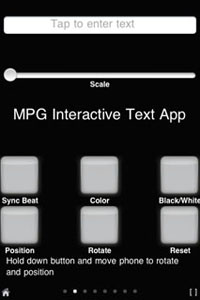
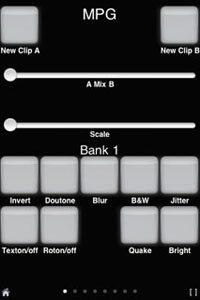
MPG: Mobile Performance Group was invited to perform at the Intermedia Festival hosted by Indiana University Purdue University Indianapolis. I am working on an interface for the iphone/itouch, using the OSC based mrmr app. I developed an interface that allows the public to control the manipulation of live video and send text messages which becomes part of the live video projection. Users are be able to do things such as mix video, choose video clips, apply effects, and use the iphone’s accelerometer to rotate and position the text and image. The festival was a blast and I will post some documentation soon.
CITY CENTERED
Last Month I presented my project Every Step at City Centered – A Festival of Locative Media and Urban Community The festival was located in the Tenderloin District of San Francisco and featured some great artist. A great event in an incredible city, I miss it already!

Collaborative Multimedia Performance Class
Below are a few videos from the final performance of a class I taught called Collaborative Multimedia Performance. In this class students learn how to collaborate with students from different majors, Music, Art, Computer Science. Students were taught a variety of techniques for live performance using electronics and software.
For this assignment students used contact mics to turn an object into an instrument. They created their own contact mics and attached them to the table and bottles to create a percussive instrument. The microphones were run through some guitar pedal effects and amplified. Students, David Plakon, Sean Kinberger and Zeb Long.
Student Ian Guthrie performs under the name Benny Loco and Uncle Abuelito. For this performance Ian teamed up with student Jana Fisher to create a visual accompaniment for his music. Jana learned how to create her own VJ software that allowed her to manipulate clips from the Twilight Zone to accompany his music. Jana built her VJ software using the Max/Jitter programing environment.
Interactivity and Art Finals 2009
Final projects from my DIGA 231 Interactivity and Art class. Students in this class learn how to program their own interactive software using MAX/MSP and how to use Arduino boards to create a link between the physical and digital worlds. Students also learn how to use a variety of switches and sensors such as distance, light, pressure, knock, temperature, RFID and heart rate sensors.
EVERY STEP
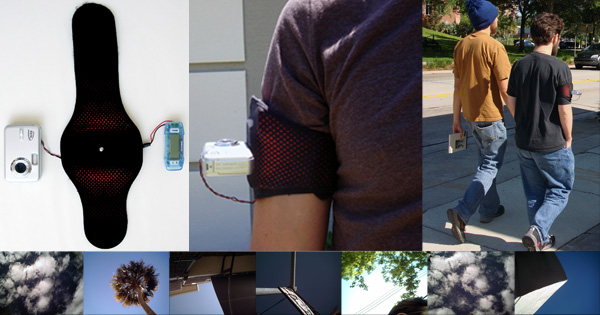
Every Step allows a participant to create a short experimental animation while they walk. Each participant is given an armband with a mounted camera and pedometer. The pedometer is mounted inside the armband and is connected to the camera. The camera is mounted on the armband and points towards the sky. The pedometer acts as a trigger for the camera and an image of whatever is above the participant is taken every time a step is made.
To create an animation the participant simply puts on the armband and takes a walk wherever he or she would like to go. When the participant returns from the walk the images are transferred from the camera’s memory and loaded into a custom software program. The software program uses the images to create a frame-by-frame animation and to create a soundtrack for the animation. When the program completes the animation, a DVD is made and given to the participant.
Every Step reviewed by We Make Money not Art “The techy work that really charmed me by its simplicity, poetry and melodies was Every Step.”
CYCLES FOR WANDERING
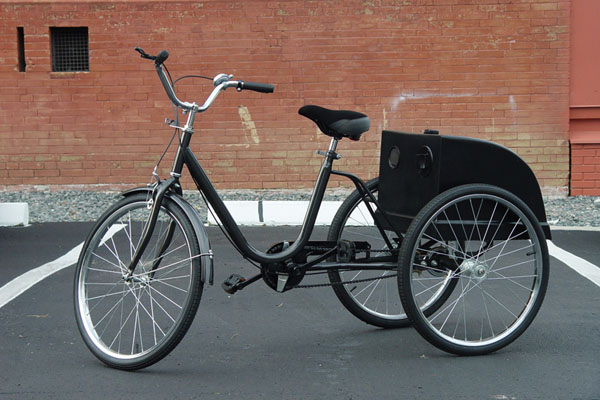
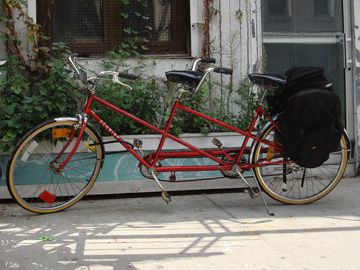
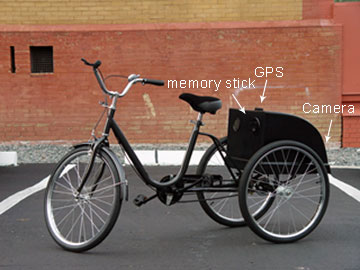
Cycles for wandering is a project that mixes a pleasurable bike ride, real-time image manipulation, locative media and user participation to create a short experimental video. To create a video a participant simply takes a five to ten minute bike ride. The bike is equipped with a GPS and video camera that records images and movements of the rider’s trip. A computer, mounted on the bike, uses the information gathered from the GPS to make decisions on how to manipulate the images taken by the camera. When the rider returns from the trip a DVD of the video made is created for them.
Recipient of Transitio Award, Transitio_MX 2007, Mexico City, Mexico
Cycles for Wandering Featured in Wired
Cycles for Wandering Featured in New York Times and Wall Street Journal
TRANSFERS
Transfers is a project exploring real-time generation of art and user participation in a mobile environment. Transfers allows a passenger of a taxi to generate a unique piece of art by giving the taxi driver directions. As the taxi moves through the city the passenger will experience a real-time manipulation of live exterior video and audio taken from a camera and microphone mounted in the taxi. The taxi is also equipped with a GPS that feeds an onboard computer data such as speed and direction. This computer is running custom audio/video manipulation software and uses the GPS data to make decisions about how the live video/audio feed is manipulated and seen by the passenger. The manipulations of the live feed is displayed on two LCD screens and heard through the cars stereo system. As the user tells the driver where to go the passenger becomes both performer and viewer as they experience a unique piece of art generated by their decisions. The software also records this performance and at the end of the drive the passenger receives a CD with a QuickTime movie file of his or her recorded performance.
Supertudo, TVE Brasil, Rio de Janeiro 2007
CAUTION
This artwork responds to the current networked devices, such as cell phones and laptops, in its vicinity with sounds and imagery of the character Lemmy Caution from Jean-Luc Godard’s film Alphaville. A computer running networking sniffing software monitors the area for wireless data such as bluetooth and wireless internet signals. When a new wireless device enters the vicinity the piece will respond by announcing the wireless device’s name and if it is considered to be a threat. This piece requires one Macintosh computer with wireless and bluetooth, custom software, video projector and sound speakers.
MPG: MOBILE PERFORMANCE GROUP
MPG: Mobile Performance Group is a collective of new media artists interested in finding new ways to present art outside of traditional venues. MPG disseminates their work by using mobile technologies, real-time video/audio, custom interactive devices, and other new technologies that allow artist to engage the public. The group has performed throughout the country and participated in several international new media festivals including Conflux, ICMC, NWEAMO and ISEA. MPG is part of classes taught, by faculty Matt Roberts (Founder and Creative Director of MPG) and Nathan Wolek (Music Director of MPG), at Stetson University’s Digital Arts Program. For more information please visit http://www.mobileperformancegroup.com
You can find more information about the group at
http://www.mobileperformancegroup.com
http://www.flickr.com/photos/mobileperformancegroup/
http://www.youtube.com/user/mobileperformance
DropBox- Alpha Beta Disco: Goddard Remix
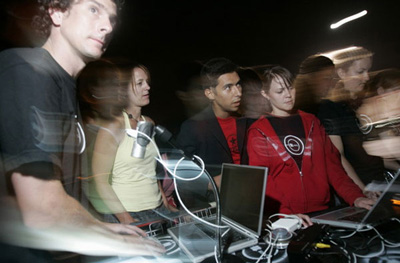
DropBox “flattens” Godard’s film “Alphaville” (1965) into a static multimedia database containing every scene, line of dialogue, sound effect and orchestral score cue. These materials are organized according to character, location and formal qualities. A 45-minute real-time performance/remix is realized solely using this database.
DropBox’s live performance represents an alternate, spontaneously improvised, non-narrative interface to Godard’s original work reproduced as a film.
DropBox relies on a primary improvisational tool “the remix” while performing with software of their design. DropBox blends elements from the “Alphaville” database with an abstract formal logic, rather than pursuing a narrative drive. DropBox cuts and pastes, overlaps and overlays, compresses and expands, filters, re-sequences and links multimedia data into new musical/visual formations.
DropBox
Matt Roberts is a memebr of DropBox which is a performance collaborative organized in 2001. Using video and audio software instruments in real-time, the duo micromanages original and found material via loops, non-linear equations and other processes.
DropBox – Duct Tape
Using only Duct Tape as material, DropBox pulls, rips and stretches the tape to create a real-time performance. Above is a document of a performance for the SubTropics Festival at PS742 in Miami Florida 2003.
DropBox
Matt Roberts is a memebr of DropBox which is a performance collaborative organized in 2001. Using video and audio software instruments in real-time, the duo micromanages original and found material via loops, non-linear equations and other processes.
DropBox- The Soft Bits
Using only materials found in the “virtual” scenes from the Disney film “Tron” (1982), DropBox creates a multimedia database of 3D landscapes, animated characters and synthetic sounds. After organizing the database according to various formal characteristics, DropBox creates a new interface to the computer world of “Tron” via a real-time performance employing original software instruments. “The Soft Bits” stretches and expands the world of “Tron” into beams of colored light and staccato digital pulses–a meditation upon the primary language of our technology.
DropBox
Matt Roberts is a memebr of DropBox which is a performance collaborative organized in 2001. Using video and audio software instruments in real-time, the duo micromanages original and found material via loops, non-linear equations and other processes.
EVENTS
Using custom video and audio software instruments in real-time. Matt Roberts and Nathan Wolek present a meditation on the Florida Landscape, which is realized as an improvised new media performance.
A NEW MOVIE

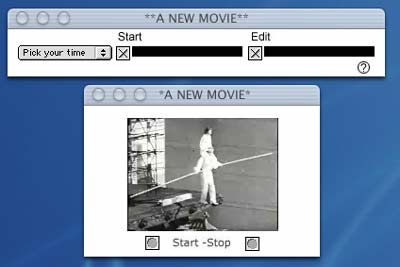
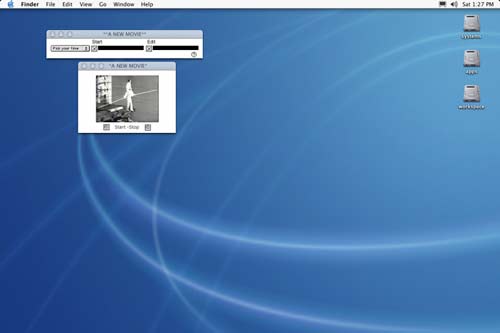
This application uses mouse movements to create a new edit of Bruce Conner’s “A Movie”(1958). “A New Movie” maps each x/y position of the users screen and assigns each position of the screen to an edit point of “A Movie”. The application watches and records the users mouse movement over a chosen period of time. When enough data has been collected the application will re-edit the original version of ”A Movie”. The user can then view the re-edited version, which keeps the original soundtrack in place but rearranges the visual track according to the users daily mouse movements.
For more information on Bruce Conner and “A Movie”
SOFTWARE
Download Application (Macintosh)
SCREEN SHOTS
CONNER TIMES TEN
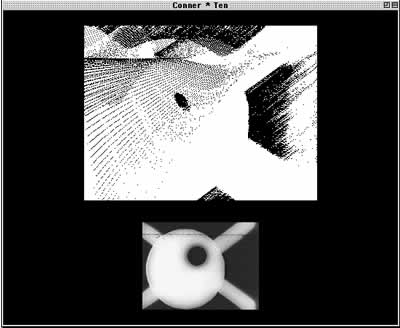
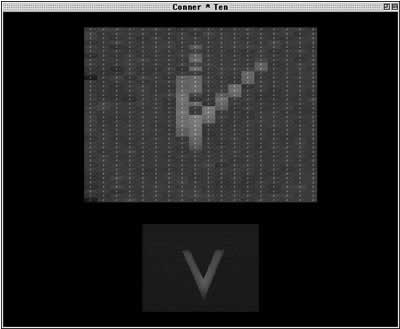
First in a series of applications made in homage to Bruce Conner, “Conner Times Ten” is an application that creates new images using Bruce Conner’s film “Ten Second Film” as its source. Conner’s “Ten Second Film”, which was made for the 1965 New York Film Festival but never shown during the festival because it was believed to be too “risky”, was made from ten film strips each 24 frames long. Using only multiples of 10 and 24 the application “Conner Times Ten” randomly chooses a frame from Conner’s “Ten Second Film” and new images are made from this frame. These new images are never the same or repeated in the same sequence.
Software
Download the application (Macintosh Classic)
Software Screen Shots
LA MEDIA NARANJA PROJECT – Electronic Güiro
Electronic Güiro
This project converts a metal güiro, which is normally used as a percussive instrument, into a video instrument. The güiro is modified with an arduino to create a link between the instrument and a computer. Every rib on the güiro becomes a switch, when a rib is struck a signal is sent to advance a video clip one frame. A musician can play the instrument as it is normally played, however in this case the performer produces video as well as audio.
La Media Naranja Project
La Media Naranja Project converts traditional music instruments, used in the Americas, into audio/visual instruments. The instruments can be played as they are normally used; however they also control real-time video manipulation and playback.
Circuit Bending Workshop @ 123 St. Augustine
I recently did a workshop in St. Augustine, FL with a group of talented young artist. We made contact microphones and modified toys and keyboards to create some new instruments. We had a blast, it is amazing what you can do in a few hours. It is always a great pleasure to share a passion for making art with others and I hope to hear more from these artist soon!
CATEGORIES
- A/V Performance
- Augmented Reality
- Collaboration
- EMP
- Exhibitions
- Generative
- Interactive
- Locative Media
- MPG
- Network Art
- New Media
- Photography
- Portfolio
- Software Art
- Teaching
LINKS
ARCHIVES
- March 2023
- February 2022
- September 2021
- January 2021
- November 2020
- August 2020
- July 2020
- November 2019
- October 2019
- November 2018
- August 2018
- February 2018
- October 2017
- July 2017
- January 2017
- December 2016
- November 2016
- August 2016
- May 2016
- April 2016
- October 2015
- August 2015
- July 2015
- March 2015
- January 2015
- November 2014
- October 2014
- June 2014
- May 2014
- March 2014
- November 2013
- October 2013
- September 2013
- June 2013
- November 2011
- August 2011
- March 2011
- January 2011
- December 2010
- August 2010
- July 2010
- June 2010
 rss feed